This article explains how to unlock a BestNotes user account that has been locked due to too many incorrect password attempts, typically performed by a System Administrator.
Permissions Required
- Manage Users
Unlocking a User Account
If a user has been locked out of their account due to their password being entered incorrectly too many times, they can wait the designated amount of time (as configured in Password settings) or request to be unlocked. Any user that has the "Manage Users" permission can unlock the account.
To unlock a user's account, follow the steps below:
- Select "Settings", then select "Users."
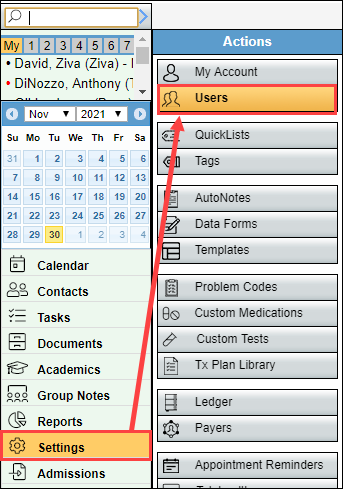
- Select the name of the user that needs unlocked to open the "User Details" screen.
- If a user has locked their account, their name will appear in red.
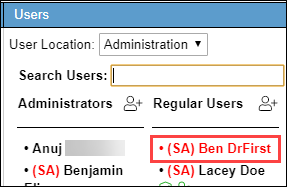
- Select the name, select "Unlock User", and then select "Save."

The user can now attempt to login without changing their password.