This article explains how diagnoses managed in BestNotes are integrated with DrFirst, detailing how they are pulled from BestNotes, displayed in DrFirst, associated with medications, and used for interaction alerts.
Permissions Required
No specific BestNotes permissions are required.
Managing Diagnoses in DrFirst via BestNotes
Introduction to Diagnosis Management
- All diagnoses are managed within BestNotes.
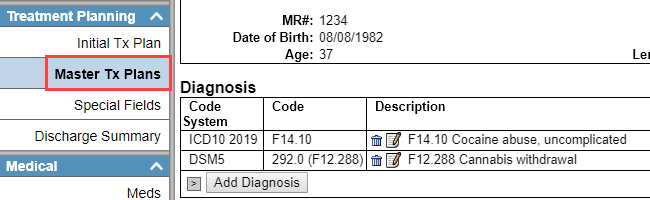
- The diagnosis will be pulled into DrFirst from the "Master Treatment Plan," and will not pull a preliminary diagnosis.
- DrFirst uses the ICD-10 code library, therefore only ICD-10 codes will pull into DrFirst.
Important Note: Diagnosis was not previously available in DrFirst. For a diagnosis to pull into DrFirst, it must have been newly added or edited in BestNotes since July 3, 2019.
Viewing Diagnoses in DrFirst
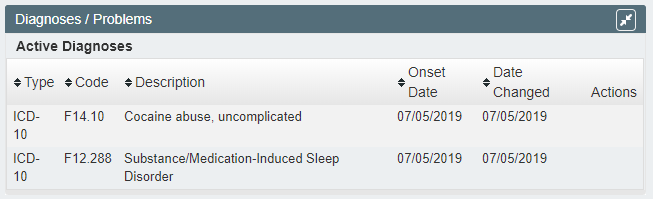
- Once you have entered your diagnosis into BestNotes, it will display in DrFirst within the Diagnoses/Problems widget.
Associating Diagnoses with Medications
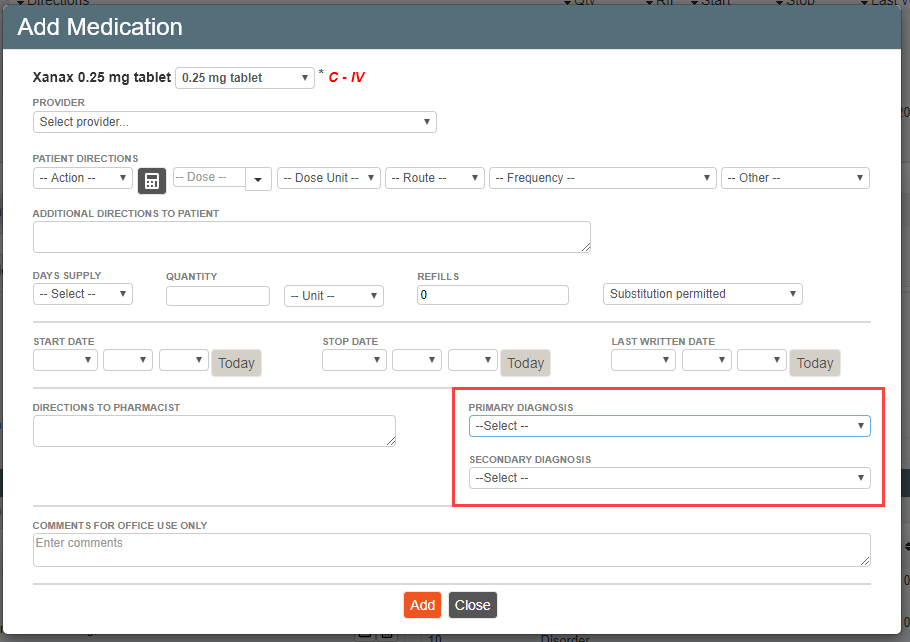
- When adding a medication, you can specify if the diagnoses displayed are to be added to the medication.
- You can also designate them as a "Primary Diagnosis" and/or a "Secondary Diagnosis."
- These fields will only be available if there is a diagnosis entered in BestNotes.

Diagnosis-Medication Interaction Alerts
- When prescribing medications, DrFirst will alert you if you are prescribing a medication that may interact with a diagnosis documented for your patient.
- The alerts will appear after you have searched for the drug and chosen the strength.