This article explains how to access and manage various utility features within the DrFirst application, including token management, favorites, agent management, pharmacy list maintenance, and signature capture.
Permissions Required
No specific BestNotes permissions are required.
Managing DrFirst Utilities
Access Utilities
- Hover on menu list in the top left corner.
- Select "Utilities."
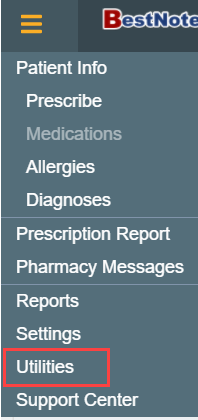
- Select desired utility item to manage.

Utilities Defined
Once you have accessed "Utilities", there are several items that can be managed. Each potential area is explained in the following sections.
Token Management
This is your EPCS prescriber dashboard. This will only be available to providers that have enrolled in EPCS.

Favorites
You can add prescriptions to your favorites list without it being used in a patient's record previously. A current list of your favorite prescriptions is provided in the "Favorites" drop-down list when using DrFirst.

Manage My Agents
Manage your provider agents. A provider agent is a clinical user that can take action on prescriptions on behalf of a provider. This will only be available to Providers.

Pharmacy List Maintenance
You can add to or modify the practice pharmacy list.

Signature Capture
Add a signature capture to the system.
