This article outlines the steps to subscribe to the Videra Sidekick integration within BestNotes.
Permissions Required
- System Administrator
Activating Videra Sidekick Subscription
NOTE: Make sure you have an updated desktop client version of BestNotes (at least v3.4). To validate which version is currently installed, please view the BestNotes Login page. The App version will be displayed in the lower right-hand corner.
Navigation
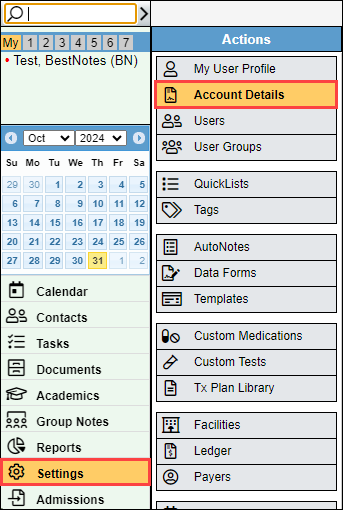
- Select "Settings" in the bottom left corner, then select "Account Details."
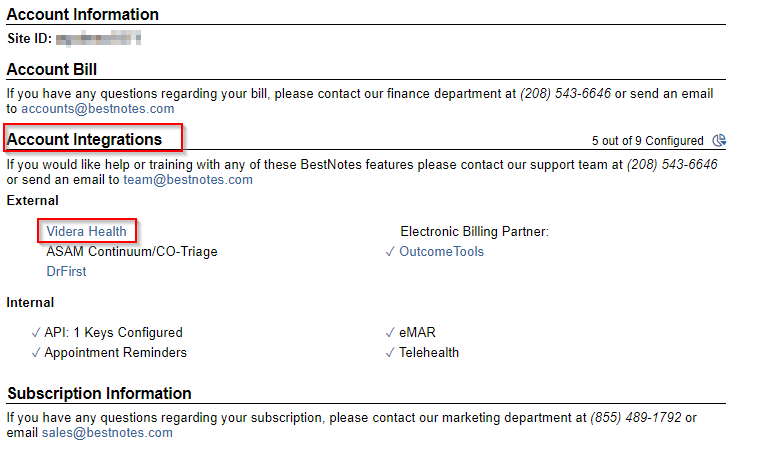
- In the "Account Integrations" section, select "Videra Health."
Note: If there is a checkmark next to the feature, you are already subscribed.
How to Sign Up
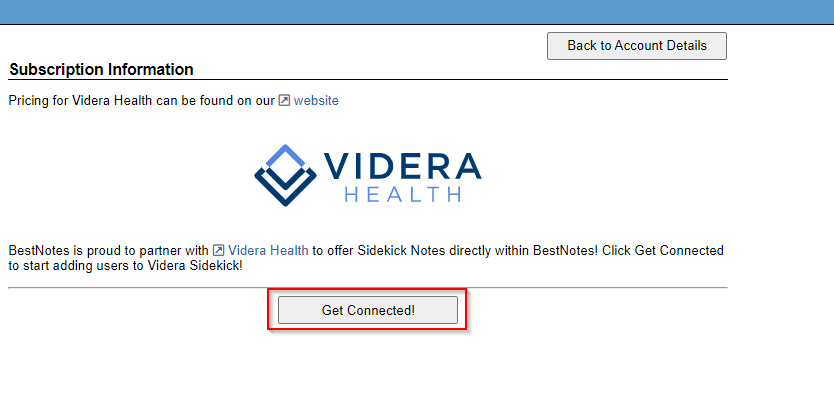
- Review the information in the "Subscription Information" section. Once you understand the requirements and have the information necessary to begin the subscription process, select "Get Connected."
- Once subscribed, the system administrator can designate Videra Sidekick users.
Next Steps
- See also: How to uninstall old BestNotes versions
- Visit Downloads for the latest BestNotes client.
- For assistance logging in, visit Login and account management.
- If you have any additional questions, submit a support ticket or call (866) 543-6646.