Permissions Required
- System Administrator
Cancelling DrFirst
Requesting Cancellation
- If you decide to stop utilizing DrFirst for ePrescribing, please send an email to submit a support ticket requesting to cancel.
What to Expect After Cancellation
- Any prescribing (provider) accounts will be deactivated at cancellation. No refunds or partial refunds are available. Ensure that no prescriptions need to be sent prior to cancellation.
- Once BestNotes Support receives your request to cancel we will begin this process. The estimated time for completion is 1-2 business days.
- After DrFirst is removed all users will manage medications through Med/Clinical utilizing the New Entry button the same way medication management occurred prior to DrFirst.
- All medications added in DrFirst will remain in Med/Clinical after the cancellation.
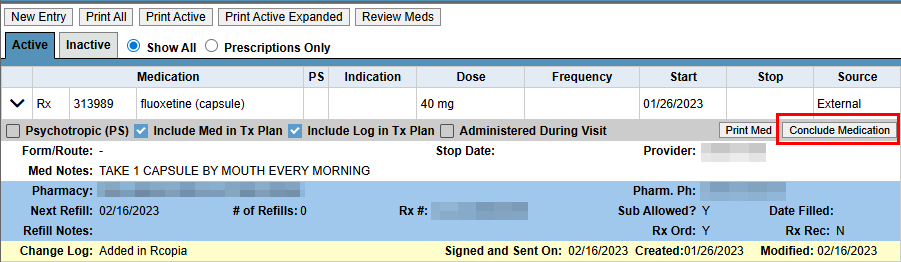
- Medications added in DrFirst can no longer be modified. The only option after DrFirst cancellation is to Conclude Medication.
If you have any additional questions, please contact BestNotes Support at (866) 543-6646.