Calendar Reports provide a comprehensive look at your practice's scheduling health and operational flow. These tools allow you to forecast upcoming revenue, track the success of patient reminders, and identify patients who need follow-up care. By analyzing appointment statuses and workflow durations, you can optimize your daily schedule and ensure high-quality patient retention.
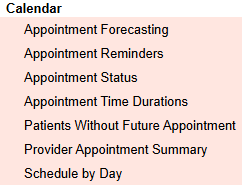
Appointment Forecasting: Previously named C-Appointment Forecasting. Displays future appointments by appointment day, time, and amount of charge. Ledger- Report All Providers permission required to display all appointments.
Examples:
Managing appointment confirmations for future appointment days
Reviewing number of 'no shows' during a particular date range or by provider
Monitoring payments collected by appointment date
Appointment Reminders: The Appointment Reminders report displays information specific to the Appointment Reminders feature when enabled. This includes how many reminders have been sent, the total cost, and the specific information of each message. It includes details such as the date sent, type, direction, patient, phone number, appointment date and time, appointment provider, appointment facility, and the content of the message. Filters can be applied based on message type, facility, and date range.
Appointment Status: Previously named C-Appointment Status. The Appointment Status report displays appointments by appointment day and time. It can be filtered by appointment date, provider, and primary contact location. Further filters include appointment types and appointment statuses such as not checked in, not checked out, checked out, no show, canceled, or all. Fields displayed include appointment type, primary contact, primary contact phone, primary contact email, provider, appointment date, appointment time, appointment length, title, notes, status, confirmed, arrived, paid, and locked.
Examples:
Managing appointment confirmations for future appointment days.
Reviewing number of 'no shows' during a particular date range or by provider.
Monitoring payments collected by appointment date.
Display / Filter Client appointments - Group by Contact (bottom right option) and click Go.
Appointment Time Duration: Previously named C-Appointment Time Durations. The Appointment Time Durations report displays the difference in days/hours/minutes between the times collected during the appointment workflow. The report can be filtered by Date Range, Facility, Provider, Appointment Type, and Status. There are four time durations calculated: From Check-In time to Ready Time, From Ready Time to Begin Time, From Begin Time to Check-Out Time, and From Check-In Time to Check-Out Time. Depending on a user's workflow, different analyses can be obtained.
Patients Without Future Appointment: Previously named C-Black Hole. The Patients Without Future Appointment report displays contacts that have been seen before and have no future appointment. It includes active contacts without an End Date (DOD), phone, last appointment, facility, appointment provider, and appointment type. The report can be filtered by facility and appointment provider (active and inactive). It can be sorted by group by time span. Canceled and rescheduled original appointment dates are not considered.
Provider Appointment Summary: This report provides an overall summary of appointments. Below the summary data, a summary for each provider in alphabetical order by first name. When a provider is selected in the filter, the overall summary goes away and displays only the information for that provider.
Schedule by Day: Previously named C-Schedule by Day. The Schedule by Day report displays appointments by day, showing individual client statuses such as no show, cancel, or reschedule. It can be filtered by appointment status and calendar level status. The report provides a detailed view of each appointment's participant status and appointment details.