This article provides an overview of the various Clinical Reports available in BestNotes, detailing their purpose, the data they display, and the filtering options available for each.
Permissions Required
No specific BestNotes permissions are required.
Understanding Clinical Reports
Clinical Reports in BestNotes display all field data from Med Clinical forms and can be filtered by Med/Clinical Tab, Status (All, Current, Past), and Date Range. They include client demographics, medication updates, and clinical assessments.
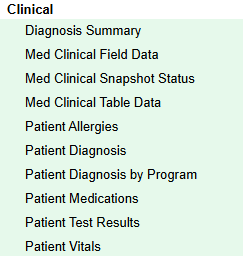
Diagnosis Summary
Displays Treatment Planning Library (TPL) data, showing the percentage of patients given a specific diagnosis and the percentage resolved. The report can be filtered by Status (All, Current, Past).
Med Clinical Field Data
Displays all data points from Med/Clinical assessments and treatment plans. The report can be filtered by Date Type and Range, Med/Clinical Tab, and Tags.
Med Clinical Snapshot Status
Ensures all patients have a snapshot of med/clinical data in their Activity Log. It can be filtered by Facility, Med/Clinical Tab, Provider, Snapshot Status, and Date Range.
Med Clinical Table Data
Displays all table data from Med/Clinical forms. It can be filtered by Med/Clinical Table (e.g., current medications, allergy), Patient “Active Between” dates within a selected range, and Format.
Patient Allergies
Displays documented allergies or adverse reactions to medications for patients. This information is typically managed within DrFirst and pulled into BestNotes.
Patient Diagnosis
Displays diagnosis information for patients. This report can be filtered by various criteria to provide detailed insights into patient diagnoses.
Patient Diagnosis by Program
Displays diagnosis information for patients grouped by program and location. It can be filtered by Date Range, Program, and Location. The table will display the CID, Name, DOB, Birth Sex, Admit Date, Discharge Date, Clinician, and Diagnosis.
Patient Medications
Displays medications listed by Patient. It can be filtered by Med Date Filter, Date Range, Med Status, and Tags. It can display the expanded view and last reviewed date.
Patient Test Results
Displays manually entered lab/test results. This report can be filtered by Test Received date range, Tags, Test, and Result Value.
Patient Vitals
Displays vitals entered by date. It can be filtered by a Date Range, Client Status, and Tag.
Back to top of page