This article explains the purpose of each report available in the Documentation section of Reports and how these reports provide visibility into clinical documentation, note activity, signatures, and documentation status. All Documentation reports are accessible within the Reports section of BestNotes.
Permissions Required
No specific BestNotes permissions are required.
Understanding Documentation Reports
The following reports provide detailed insights into clinical documentation, note activity, signatures, and documentation status within BestNotes.
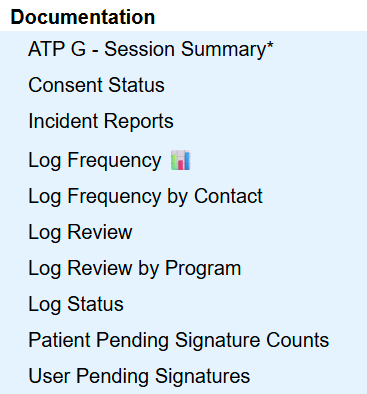
ATP G – Session Summary
The ATP G – Session Summary report displays session summary information for ATP group therapy reporting.
Key details
- Displays Date, Provider, Session and Attendance
- Filtered by Tag, Date Range, and Client
Consent Status
The Consent Status report displays all patient consent records, including authorized recipient information, purpose of release, and expiration dates.
Key details
- Displays all patient consents
- Includes authorized recipient information
- Includes purpose of release and expiration date
Incident Reports
The Incident Reports report displays incident-related documentation records within the selected criteria.
Log Frequency
The Log Frequency report displays the frequency of documentation entries for a selected note template over a specific time period.
Key details
- Displays frequency of a selected document type
- Can be filtered by Template and User
- Can be filtered by Month and Year
Log Frequency by Contact
The Log Frequency by Contact report displays the count of documentation entries per contact and the number of locked documents per log type for each contact.
Key details
- Displays document counts per contact
- Displays number of locked documents per log type
- Can be filtered by date type, Tags, and log type
Log Review
The Log Review report displays documentation log entries within the selected criteria.
Key details
- Displays documentation log entries
- Supports date range filtering
- Can be filtered by tag and log type
- Can be filtered by user and signature status
Log Review by Program
The Log Review by Program report displays documentation log entries for active program participants within the selected criteria.
Key details
- Displays program-level documentation activity
- Can be filtered by date range, program, location, provider, log type, and tag
Log Status
The Log Status report displays documentation log entries that match selected criteria.
Key details
- Displays entries matching selected filters
- Can be filtered by date range
- Can be filtered by indicator (Off, On, All)
- Can be filtered by status (Unlocked, Locked, Audited, All)
- Can be filtered by entity type
Patient Pending Signature Counts
The Patient Pending Signature Counts report displays documentation items that have not yet been signed and the number of required signatures for each contact.
Key details
- Displays unsigned documentation items
- Shows required number of signatures per contact
- List of the documents that are pending signatures for patients.
User Pending Signatures
The User Pending Signatures report displays documentation items that require user signatures within the selected criteria.
Key details
- Displays unsigned documentation items
- Can be filtered by Tags