This article explains the BestNotes Common Application feature, allowing families to complete a single application that can be shared and transferred to multiple programs. It provides instructions on how to transfer applications between companies.
No specific BestNotes permissions are required.
Visual Tutorial
Click Play button
Transferring Common Applications
BestNotes has the functionality of a Common Application. This is an application that is used so that families only need to fill out one application that can be shared and transferred to multiple programs. Companies who want to use the Common Application must use the BestNotes Application. No modification can be done to this application. Questions can be hidden, but know that if a question is hidden for your company and you receive an application where that particular question is not hidden, you will not see the response when you receive the application. Please contact BestNotes Support at submit a support ticket to setup the common application for your company. Below are instructions on how to transfer applications from one company to another.
- Application is submitted by the family.
- Review Common Application in the BestNotes Admissions module.
- Import the application into BestNotes for your own inquiry management (if needed).
- Click the Transfer Application button.

- On the Transfer Application dialog screen, select the company(-ies, multiple, Hold Ctrl+Click) that you recommend the family forward their application on to.

- Click Transfer.
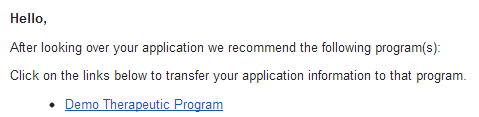
- An email will be generated and sent to the family.
- This email will contain links to each company you recommend they send their application to.
- The family will then click the link(s) to send the application to the companies of their choice.
- The family will have a portal account created at that company.
- Archive & Lock the application in your admissions module.