This article provides tips and examples for using various operators and filtering techniques when generating reports in BestNotes, including the underscore, asterisk, and 'not equal' operator.
Permissions Required
No specific BestNotes permissions are required.
Visual Tutorial
Report Filtering Tips
NOTE: Providers are filtered by their BestNotes Username
NOTE: To get the inlist option using certain criteria choices you must first save your saved report. Then this option will be available.
_Underscore_
For Example, to display contact's birthdays per month:
- Select Fields to Display (Name, Age)
- Select Filter Criteria (Date of Birth - DOB)
- Select the Like operator
- Insert 4 underscores ____ the month XX and 2 more underscores __ (e.g. ____04__)
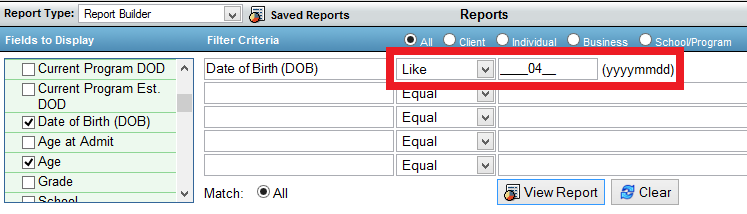
- Click View Report
*Asterix*
For example, use the * OR % sign in place of letters or numbers.
- e.g. search for "Washington"

- e.g. search by Zip codes

Not Equal Operator
For Example, find Contacts with End dates:
- Select Fields to Display
- Select a date field in Filter Criteria (End Date (DOD).
- Select the Not Equal operator
- Leave the next box blank (empty)

- Click View Report