This article provides instructions for logging into the BestNotes mobile app, setting up your PIN, and troubleshooting issues like a forgotten PIN or recently changed password. It also outlines the necessary permissions for mobile access.
Permissions Required
- Mobile Application Access
Logging In to the BestNotes Mobile App
To ensure compliance with HIPAA regulations, mobile devices (cell phones and tablets) accessing Personal Health Information (PHI) must have two layers of security:
- The mobile device itself must be protected/locked by a password or PIN.
- The BestNotes mobile app, which accesses PHI, must also be protected/locked by a password and PIN.
BestNotes utilizes both a PIN number and your BestNotes password to secure your PHI on mobile software.
Granting Mobile Access (System Administrators Only)
To enable remote mobile access for a user's device (e.g., iPhone, Android), a System Administrator must grant the necessary permission:
- Go to the User's Details.
- Navigate to Permissions.
- Select Settings.
- Check Remote / Mobile Access.
Initial Login
After mobile access is granted, log in to the BestNotes mobile app using:
- Your Site ID
- Your BestNotes Username
- Your BestNotes Password
Note: When entering text, be aware that BestNotes Mobile sometimes adds an extra space before a special character.
Setting Your Mobile App PIN
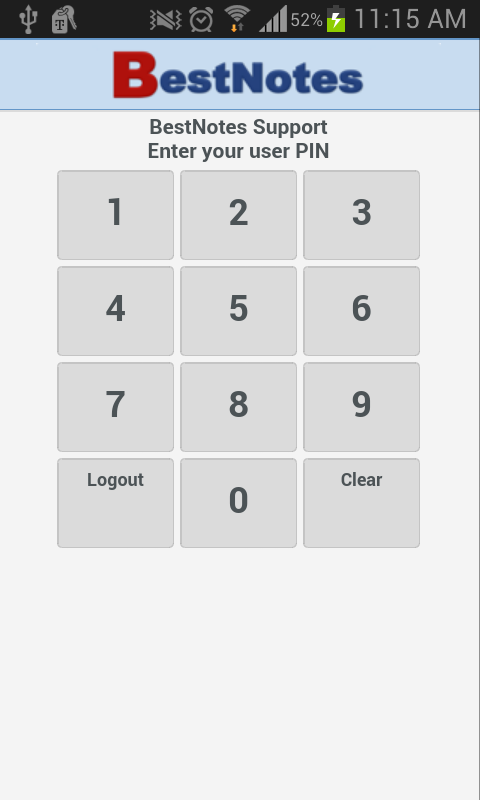
After your initial login, you will be prompted to set a 4-digit PIN for quick entry into the app:
- Enter a 4-digit PIN. This PIN will unlock the BestNotes App when you return to it, unless you have recently changed your BestNotes password.
If You Forget Your PIN or Recently Changed Your Password
If you forget your BestNotes App PIN or have recently changed your BestNotes password, you will need to log out and re-enter your credentials:
- Press Logout (located under the "7" button in the app).

This will require you to re-enter:
- Your Site ID
- Your BestNotes Username
- Your BestNotes Password
- A new 4-digit PIN to unlock the App every time you return (this PIN is only stored on that specific device).