This article provides a historical overview of BestNotes development updates, eMAR enhancements, report changes, and calendar improvements from December 2016 back to November 2012, covering various system functionalities, mobile applications, and security.
Permissions Required
- eMAR Configure Settings
- eMAR Manage Patients
- Allergies
- Diagnose
- Add DSM-5 Dx
- Ledger All Providers
- Edit Appointment Types
- Overlay Calendars
- Schedule for Others
- File Audit
- Web Portal
BestNotes Updates (2012-2016)
November 14, 2012 - Default User Types
System Administrators are now able to create User Types based on staff roles. Administrative staff will be able to use Default User Types to streamline adding or updating a user's permissions. For more information Click HERE
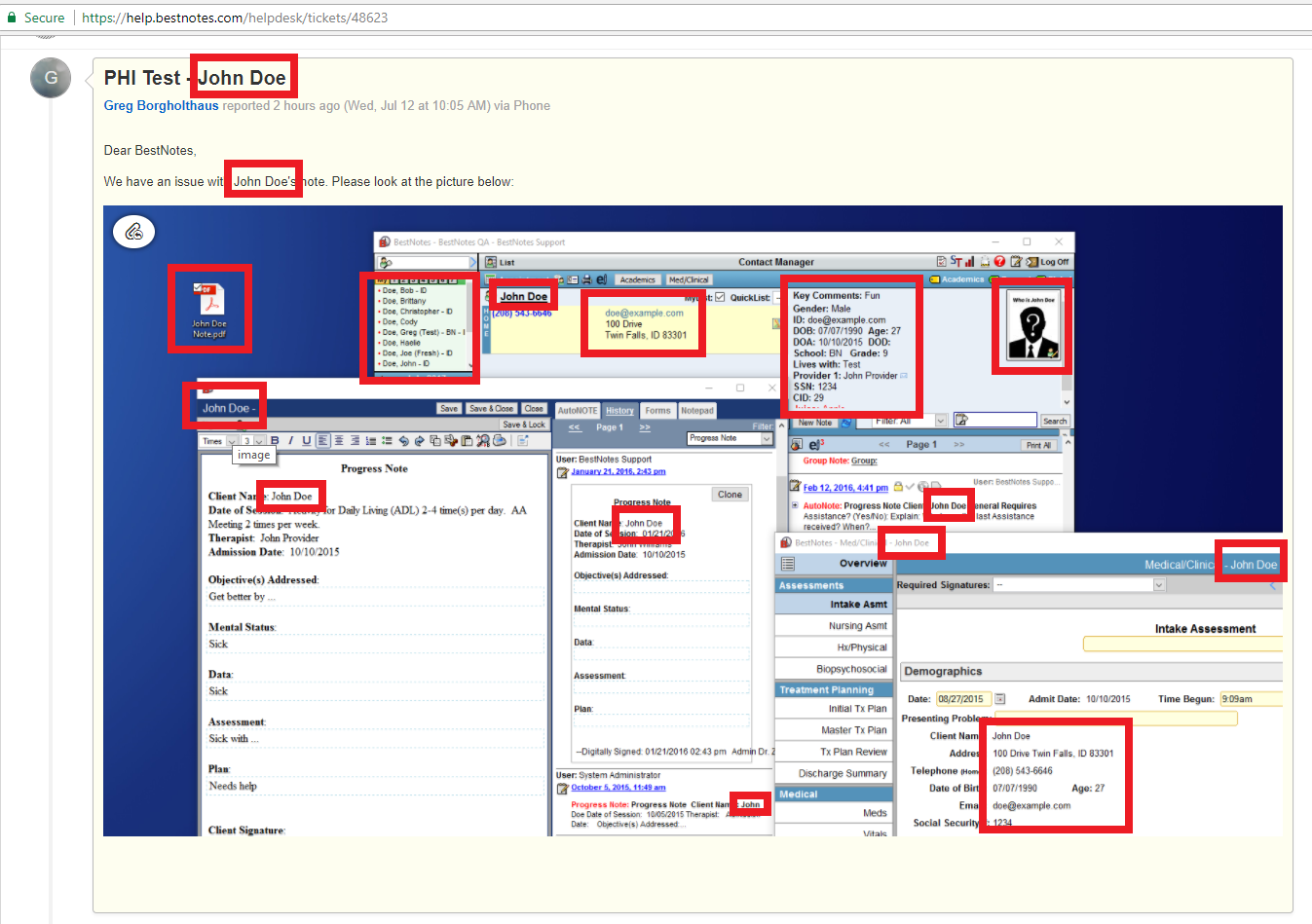
PHI Issues
December 5, 2012 - Level of Care: Client-based management for stages of care
The Episode tab captures program specific information, including level of care, start date, estimated end date, end date, relevant staff (i.e. Therapist, Case Manager, etc.), and location (if specified). More information can be found HERE
December 15, 2012 - Treatment Planning Library Module
We have a dedicated multi-disciplinary Treatment Planning area complete with the DSM-IV codes and criteria. The treatment team will be able to add a diagnosis and create problems with associated goals, objectives and interventions. Information from the Treatment Plan automatically populates the Treatment Plan Review and Discharge Summary. System administrators, please contact BestNotes to have this feature enabled.
January 7, 2013 - Client Pin Signature
The client PIN signature system allows a client and related contacts to digitally sign documents using a secret PIN number. Contacts must be on-site to use the PIN system. More information can be found HERE.
February 20, 2013 - New Special Fields
NEW special fields have been added for use in pulling information into documents. These special fields will help you pull in a list of users into an Autonote or template or a list of providers into an Autonote or a template. A full list of all Special Fields can be found HERE.
| Other | |||
| Data Form Fields | {XDATA_data field number} | List of all active providers sorted by first name, last name (AUTONOTE) | {X_ALLPROVIDERS} |
| e.g. {XDATA_112} | Provider 1 list (Autonote) | {X_PROVIDER1} | |
| Med/Clinical Fields | {XMDATA_field number} | Provider 1 list (Inline) | {X_PROVIDER1_TXT} |
| e.g. {XMDATA_354} | Provider 2 list (Autonote) | {X_PROVIDER2} | |
| Provider 2 list (Inline) | {X_PROVIDER2_TXT} | ||
| List of all active users sorted by first name, last name (Autonote) | {XUSERLIST} | Provider 3 list (Autonote) | {X_PROVIDER3} |
| List of all active users sorted by first name, last name (Inline) | {XUSERLIST_TXT} | Provider 3 list (Inline) | {X_PROVIDER3_TXT} |
| Provider 4 list (Autonote) | {X_PROVIDER4} | ||
| Provider 4 list (Inline) | {X_PROVIDER4_TXT} | ||
April 12, 2013 - Date Span Filter on Activity Log and General Log
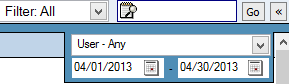
Companies can now filter for notes using a date span on the General Log and a client's Activity Log. From the Activity Log this update will allow users to view or print a group of notes for the selected date range or user. On the General Log it will allow a user to view a group of notes for the date range or user selected.
To access the date span filter, click on the carrot icon to expand.

Users can filter by user and/or date span.
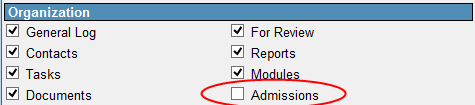
May 20, 2013 - Admissions Module Permissions
Staff who can modify User permissions now have the ability to assign or remove access to the Admissions Module. The new User permission has been added to the Organization permission section.
June 25, 2013 - Mobile App for Apple Devices
Check out BestNotes on your iPhone or iPad mobile device. For more information Click HERE
August 21, 2013 - BestNotes Security Update
Password Settings wizard. For more information Click HERE
September 11, 2013 - New Report Builder Options
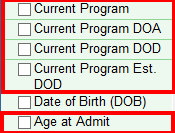
New "Fields to Display" options for "Levels of Care" (Programs) and "Age at Admission". These are found under the "Contact Detail" option.
 |
|
| *NOTE: For companies that provide concurrent Levels of Care the returned information will be comma delimited. |
BestNotes also offers new "Filter Criteria" for specific "Age at Admit" and "Levels of Care" (Programs) from the "Contact Detail" option.
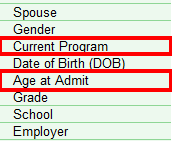
- Current Program - the user will be presented with a drop down list of available Programs to choose from.

- Age at Admit - will allow the user to enter a numerical value (age) that BestNotes will return
For Example: If a company serves 16-24 year old clients and wants to find out how many clients were 16 when they were admitted for the calendar year 2012 the following filter criteria would be used:
|
October 1, 2013 - New Android App available
Download the BestNotes app from Google Play now (Apple App available on iTunes). For more information Click HERE
March 7, 2014 - New Report Filters: Tag, DOD & Inactive Status
Report now includes client details and filtering for Tag, DOD and Inactive Status. The red question mark has the reminder for report filtering.
March 11, 2014 - New Report Filter: Business List
There is a new library report (available to all companies) called 'Business List'. This will give a listing of all contacts that are of 'business' type (not client) and their related contacts. It can be filtered by state or by tag associated to the business.
March 18, 2014 - DSM-5 And ICD-10 Update
BestNotes is preparing for DSM-5 transition. For more information, go to bottom of webpage after Clicking HERE
April 11, 2014 - Caseload by Provider Report update
- The library (available to all companies) report 'Caseload by Provider' was modified. Changes include:
- provider drop downs show active/inactive statuses
- date range added. Previously user could only select Current, past or Inquiry. Now they can filter by a specific date range for either admits or Inquiries.
- Client count was also added recently in the subtotals
April 16, 2014 - New Report Filter: Diagnosis Axis 1 Report
This report (available to all companies) has been renamed to Diagnosis Axis Report. Our customers can now select which diagnosis they would like to view, or can select 'All' to view all diagnosis. New columns have been added for 'Axis' and 'DOD'.
April 24, 2014 - New Report Filter: P - Program Demographics
There is a new report available to all customers called "P - Program Demographics".
This report will allow BestNotes Users to show all clients active in a program/location for a particular date range. They can also change the sort and show all Programs a client was active in during a particular date range. It auto-calculates program length of stay and program days during date range. There are fields to allow them to pull in an additional demographic or data form information as well.
This is a way to filter report requests that are asking for the ability to see all the programs by client.
April 30, 2014 - New Apple Mobile App
The latest version (2.2) of BN Mobile is available in the Apple App Store. Included are several bug fixes and the new signature pad. By default all BestNotes users will use the PIN system for contact signatures.
For more information Click HERE
May 20, 2014 - Provider / Dr. Physical Signature on iPad / iPhone
- The signature line to sign on (with finger or stylus) replaces the spot where the pin number typically is entered.
- Any template and HTML based note will show the actual physical signature in the note after it is signed.
- But, when a "text" note is signed
- The physical signature will not show up in the displayed note
- It will only say that this note was digitally signed by that user
- This kind of note will show the actual physical signature at a later date.
NOTE: This feature will be turned on for your whole company and not individuals.
May 21, 2014 - Dx Custom Label & Calendar Dashboard
Custom Label
Customers can now specify a custom 'label' to each ASAM level (1 - 6). When users go into the Dx wizard the labels specified by that customer will appear in the drop down dimension drop down. In this example I've relabeled the typical 1 - 6 to read category 1 - 6 and changed the dimension label to read Dx Cat. The label selected will reflect in the master problem list as well as the problem details section of the MTP. These changes are company prefs and can be set as a misc_var by support.
For more information Click HERE
Calendar Dashboard
When you are in other functions of BestNotes (Settings, Contacts page, etc.) or have any calendar view, OTHER THAN the User, single day view, clicking on the Calendar navigation button, or a date on the Dual calendar, will switch back to the Dashboard. To stay in a group view and change the date, use the Blue Arrows at the top left, or click on the date at the top and a calendar will pop up for you to choose a date.
For more information Click HERE
June 3, 2014 - Medication Review Report
There is a new report titled "Medication Review". This report replaces three reports that were previously available named: Medication - Active, Medication - Expired, Medication - Refills. The same reports can be generated from this new report with additional features. The criteria button (red question mark) explains the filtering and sorting options.
July 15, 2014 - Calendar Update - Overlay Calendar
BestNotes Development has updated the Calendar to overlay individual user appointments on the single day view.
August 4, 2014 - New Reports
The report is useful for management from a documentation audit standpoint. For example, if an initial assessment is supposed to be completed within 7 days of client's admit date, the report can be run to find all clients with an admit date in the last 7 days. It will show those that do not have that document started (no document), those with the document started but not completed (unlocked) and those with the document locked. There are columns titled 'DTC Initial' and 'DTC Admit', this will display the # of days between initial contact/DOA and the document date. So, for example, If a company has a business rule to complete a document within 2 days of admit, this gives them a tool to review days to completion. Finally, it also displays a signers summary showing those that are still pending signature or the date they signed their documentation.
Related Contacts by Tag - this is a great report for mailing lists and exports. They can print a list of recently discharges clients with their parents info (follow up with family). Or Recently admitted clients and their referrers (thank you cards to the referrer). If they want a spreadsheet, similar to what they give us for imports, this is a great tool (use export format).
C - Appointment Status - report can be used to display provider productivity by appt type showing total time and number of appts.
Referrer Statistics - this report also now displays the last referred (most recent initial contact date).
August 21, 2014 - Log Review by Status Report
- The report can be run to find all clients within date range selected (selection on admit date, initial contact date or discharge date). If a company is using locations, a location drop down will display. If they are not using locations they will see a dropdown displaying their tag list. The report can then further filter for all clients or just those within a specific location/access tag.
- The template type selection does allow for all med clinical (ie. all COMPR and Tx plan tab snapshots), email, appts and other log types.
- The report will display all clients that fit that date range grouping them by those with 'no document', those with document in 'unlocked', 'locked' and 'audited' statuses.
September 16, 2014 - General Log Update
- BestNotes will retrieve the first 50 documents on page 1. To move to the next 50 records, click to page 2 and these steps are repeated for the next set of 50.
September 24, 2014 - Web Portal Icon Update
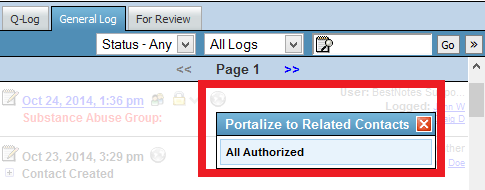
- BestNotes users will be able to choose which related contact (with the web portal permission) can have access to a Note on the client's Activity Log via web portal.
October 1, 2014 - Calendar
Overlays
- The Calendar Overlay for single/multi-user selection will default to single day column view.
Create Appointment
- Date placement has moved to top. Also, try using the TAB key for faster entries.
October 16, 2014 - Duplicate Client Report
- Searches the client list and displays any clients that match on either; last name/DOB, first name/DOB, first name/last name. It can be filtered to include active clients only or display all. It will sort the list with oldest CID first, showing them the 'first created' client and then any matching duplicates.
October 22, 2014 - Group Note General Log Portal Button
- To send a Group Note to all the linked clients and/or their parents, go to the General Log, find the note and click on the Globe Icon.
November 13, 2014 - Log Review by Status & Log Review by Log Date
- "Log Review by Status" and "Log Review by log date" has a column of when the document was created. This column is only populated with information when the user running the report has the "File Audit" permission.
November 19, 2014 - Online Applications & Portal Accounts
Applications
- Allow an application already connected to a client to be unlinked and linked to a different client.
Portal PIN
- New ways to Link/Unlink a contact's Portal PIN to their portal.
December 5, 2014 - Contact's Register (Tab) Ledger
Change +/- Values in Ledger
- Wording has been changed from "Total:" to "Balance:".
Balance Calculations
- The balance calculations have been changed. Charges are counting as positive whereas Credits are counting as negative. This is to clear up confusion with balance. For example: a balance of 100 indicates that the client owes a balance of 100.
Recurring Appointment
- When you were creating a recurring appointment, if future instance of that appointment were to overlap with cancelled appointments, it would show this as a conflict. An update has been made that allows for recurring appointments to be scheduled overtop of cancelled appointments without showing it as a conflict.

"Provider IDs" Tab Renamed to "Provider Setup"
- The 'Provider IDs' tab has been relabeled to be 'Provider Setup' on the user settings dialog box. BestNotes added a section in this tab that users can use to specify which appointment types a user can be affiliated with. If a user doesn't have anything selected that can be apart of any appointment type, however, if they do have appointment types selected when you try to schedule an appointment with that user as the provider, the options that are available in the appointment type drop down will be limited to the appointment types specified for that user.
December 6, 2014 - Med / Clinical Required Signatures
Related Contacts
- Now choose a related contact to sign Med / Clinical documents:
- On-site
- Portal
January 9, 2015 - Calendar Status on Client's Activity Log & Tooltip
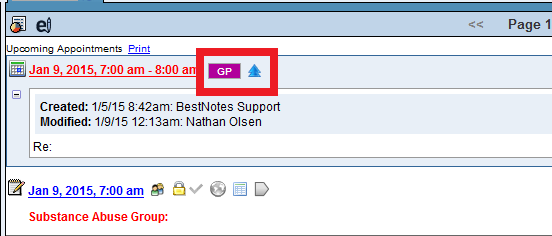
Calendar Appointment Icons
- The appointments on a client's activity log now display the token and the icon indicator of it's current status. Also, when you expand the appointment to see more details you can see who and when it was created and modified.
Tooltip (Hover over appointment on calendar)
- The calendar tooltip now contains the full name of that events appointment type, who created the appointment and the time, along with the name and time of the last person who modified the appointment.
January 14, 2015 - Ledger Report Balance
- As BestNotes is preparing to introduce insurance and customer billing functionality, the balances on the individual client register and register/ledger report are being aligned with the coming customer statement balances.
- What does this mean for your company? Simply, starting Wednesday, 14th January 2015 the register/ledger report Balance for a client will show the same positive or negative balance as the individual client register.
- Currently, the individual client register for a charge shows a Positive Balance signifying that the client owes payment.
- Currently, the Register Report for this client shows a Negative Balance (e.g. -60).


- The change on January 14, 2015 will make the Balance on the register/ledger Report (see client's example below), a Positive amount to match the client's register balance (e.g positive 60).
January 16, 2015 - C - Appointment Report

- Include Global (optional checkbox) - When provider is set to 'All', these types of appointments will not be included (previously they were). 'Global' appointments are commonly use to block out vacation, lunches etc.

- Standard Appointment types (default when no appt type selected) - these will still be included if 'All Appt Types' is selected. The 'Standard' type is now in the list of appt types to select from. Standard appointment types were showing up in 'Appt Type' column with blank description, this has been corrected to show 'Standard'.
- Report Summary (optional checkbox) - For customers that just wanted to export their appointments this gives them a cleaner export. The summary was always displaying previously.
- Log/Ledger Details (optional checkbox) - this will pull in any documents linked to the appointment and their status icon (locked, unlocked, audited). And also any ledger entries tied to the appointment. Permissions are like Register/Ledger report, if the user has reports permission they can see their own charges. If they have 'Ledger - All Providers' permission they can see all charges.
- The Primary Contact's future appointments (up to 5) will also display.
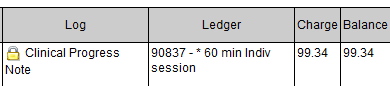
- And other minor updates...
January 22, 2015 - C - Appointment Status Report
- The 'C - Appt Status Report' was updated this morning so that it will pull ledger information. Previously it only pulled ledger information if there was a document. Now it will pull all log and/or ledger information for that appointment.
- Other updates this morning:
- If screen was not maximized the details would float to the right of the screen. Report no longer has to be run maximized, however with all of the filtering at the top a high screen resolution (i.e. monitor full screen) will still work best.
- Future appointments - now optional. It is time consuming (i.e. makes report slower) to pull this additional data so displaying future appointments is now a checkbox at the top.
January 29, 2015 - Calendar Overlay and Appointment Updates
Calendar Overlays
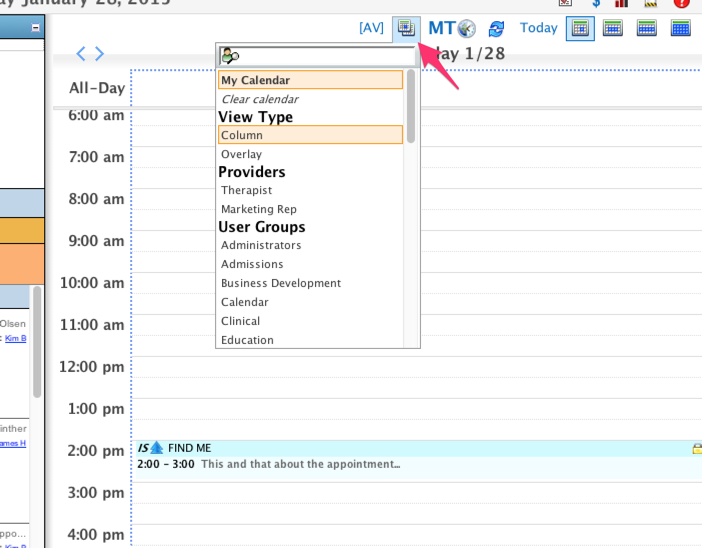
- Multi-user and group overlay buttons and their functionality have been combined. Users will need to have the Overlay Calendars permission to see the button and views.
Schedule for Others Permission
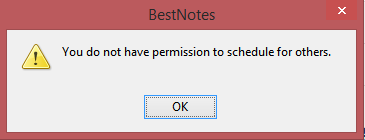
- The Schedule for Others Permission is required to create appointments for other BestNotes users.
Appointment Status
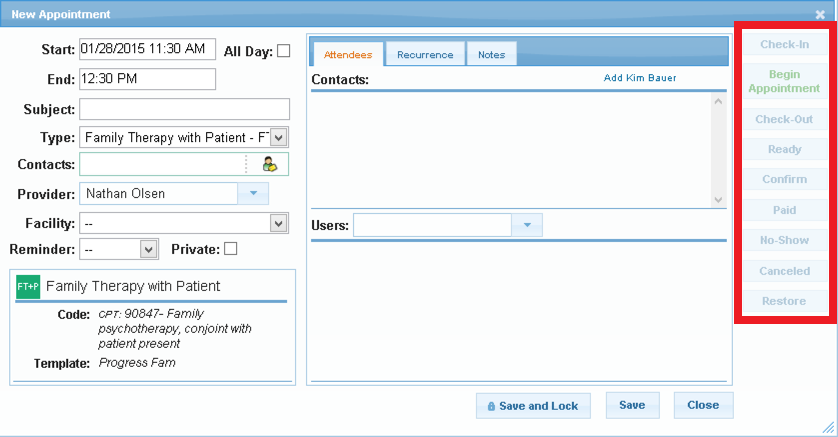
- The appointment status buttons have been moved to the right-side of the appointment window.
January 30, 2015 - Calendar Report
- C - Appointment Forecasting (Beta customers only): displays future appointments by appointment day, time and amount of charge. A couple of examples of how this report can be used: managing appointment confirmations for future appointment days, reviewing number of 'no shows' during a particular date range or by provider, and monitoring payments collected by appointment date.
- Ledger All Providers permission required to display all appointments.
- Hold the control (CTRL+) key to select multiple Appointment Types and Statuses.
- Ledger must be checked for the client.
February 4, 2015 - Calendar Appointment Type Update
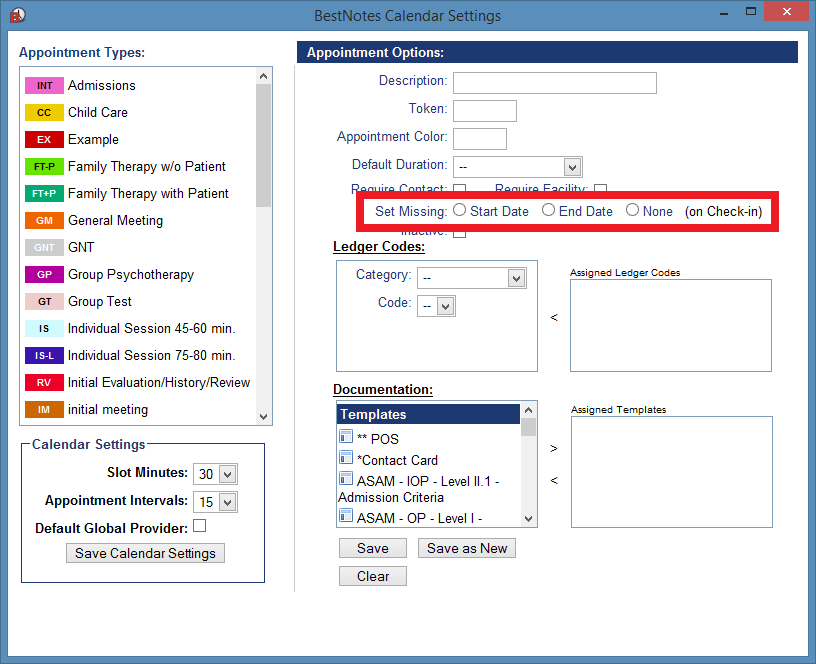
- BestNotes has added the ability to enter a missing Start Date (Date of Arrival - DOA) or End Date (Date of Discharge - DOD) to a client's details with appointment types. The Start Date or End Date that will be entered will be the date of the created Appointment and its Check-in time.
- NOTE: Use the End Date button sparingly (e.g. Exit Interview, Leaving Center, etc.).
- Currently, your company's appointment types are set as None and require a BestNotes user with the Edit Appointment Types permission to select these options.
February 24, 2015 - Related Contacts by Tag Report
- Major additions: A drop down was added so you can select related contacts' tags in addition to client tags. An option was also added so the results could be viewed by Client (listing clients with their related contacts) or by Related Contact (showing related contacts and all clients they are related to).
- For example: Referred out, emergency contacts, multiple children in system, etc.
- Export Format lists all demographics. For example: Mailing labels. etc.
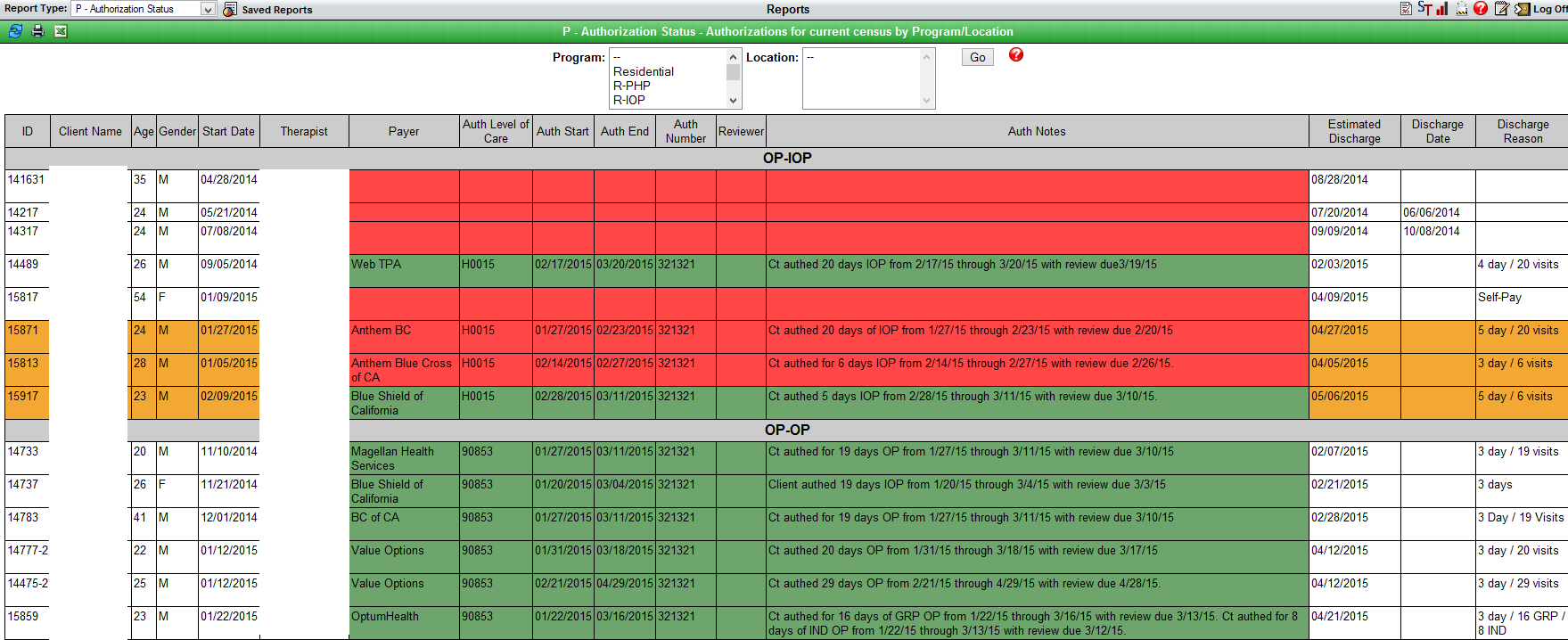
March 2, 2015 - P - Authorization Status Report
- P - Authorization Status Report: displays all clients that are active in a program and group them by program/location.
- It can be filtered by Program and Location (Ctrl+Click for multiple filters).
- This report displays ID, Client Name, Age, Gender, Start Date, Therapist, Payer, Auth Level of Care, Auth Start, Auth End, Auth Number, Reviewer, Auth Notes, Estimated Discharge, Discharge Date & Discharge Reason.
- Example: At a glance, this report provides students' authorizations that may need follow up.
- Red = the authorization's end date is in the past.
- Green = Auth has not yet expired.
- Orange = displays recently discharged (last 7 days) clients.
March 4, 2015 - Print Group Overlay Calendars in Single Day Agenda Style
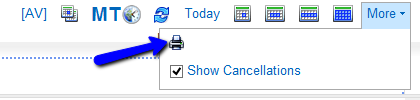
- Printing is now available for 2 or more users in Single Day View.

- Use the More button on Single Day Column or Overlay Views.
- Agenda Style example with appointments:

- Appointments are ordered from am to pm.
- If appointments have the same start time they are grouped and ordered by when they end (e.g. an appointment with a 10:30 AM end time will come before an appointment with an 11 AM end time).


- Agenda Style example without appointments:
March 10, 2015 - Modifier & Add On
- The Register Tab now includes Modifiers and Add Ons.

April 5, 2015 - Q-Log Fix
- Med/Clinical Window displays "Saving" when you click out of a text box field, radio button, input type, etc.
- Also, it displays when it has not saved:


- When error is fixed, refresh the page.
April 14, 2015 - Insurance Billing Setup
4 Steps to Prepare BestNotes for Claims
- Your BestNotes System Administrator will log in and create your company's facility(ies).
- Add NPI to Users, Add Payers, Update Ledger Settings.
- Client's information: Update demographics, Add Payers, Update Register tab, Create claim.
- Preliminary claims queue report, Release claims.
April 14, 2015 - Reports
Portal Account Created
- "Display Linked Only". If this is checked it will only display portal accounts where the PIN has been linked in the 'edit client' screen.
- Additional Column titled 'Related Clients - with Web Portal' - if a portal account is linked to a contact (the portal pin is set). Then, if that user has the 'Web Portal' relationship checkbox marked for any clients, those clients will display here.
- The report now lets staff see the full picture of each portal account. It shows what applications were filled out using this portal account, what contact it is linked to in BestNotes (via Portal PIN) and also any clients they may have access to see their documents via the 'Web Portal' relationship.
P - Program Demographics
- Added Date Type option. The default date range is the same as it used to be and will only show clients active in a program during the date range. The additional options of 'program admit date' and 'program discharge date' give more filtering options.
- Added Data Form selection (red selection in screen shot). This report will pull in any data form with less than 30 fields. If they select the form name it will pull all data fields (except sections) in that form for each client.
April 28, 2015 - Q-Log Change
- After creating a Q-Log message and clicking Send & Archive or Send, BestNotes returns to the Q-Log tab, even if the For Review tab has messages.

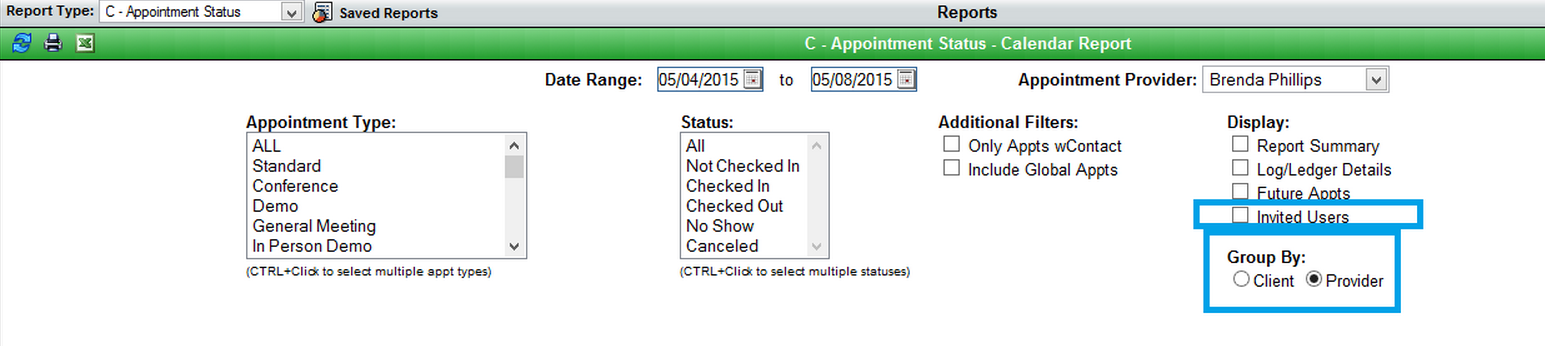
May 11, 2015 - C-Appointment Status Report
- Added Invited Users (Additional users on appointment).
- Group By:
- Provider (original report).
- Client (similar to C-Appts by Client, but with Ledger entries). Be able to see all future appointments for one client.
May 13, 2015 - Calendar
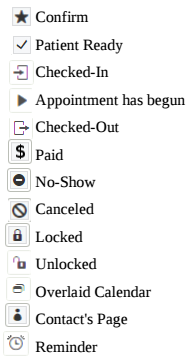
- New Status Icons (Right-Click Menu and displays on appointment)
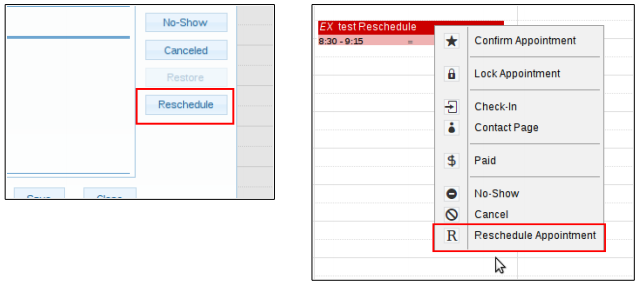
- RescheduleButton and Workflow
- Opens Blue Calendar (e.g. Only appointment times can be changed if time is needed for this rescheduled appointment).
- Click Exit (upper-right) to return to the regular calendar.
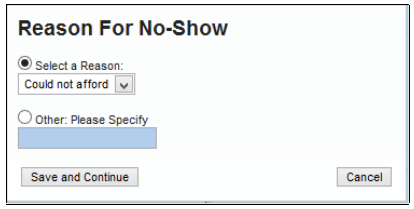
- No Show / CancelReasons
- If Cancel or No Show is selected, a window will prompt the user for more details.
- Activity Log:
- Right-click to Update Status.
- Expand to see all appointments for a client.
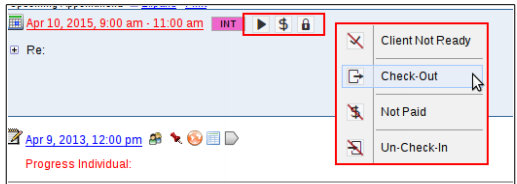
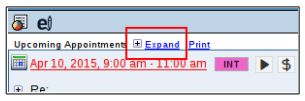
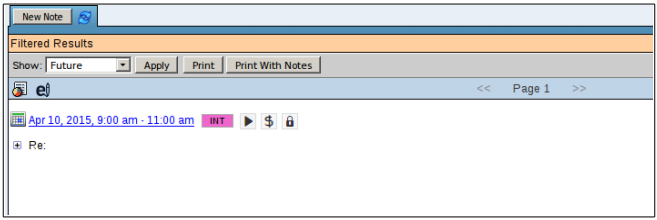
- Begin Appointment not available on right-click menus after it is clicked.
May 29, 2015 - BestNotes Performance Improvements
- You should see marked improvement in the performance of BestNotes. Several updates and server upgrades have been put in place this week. Additional updates will be rolled out over the next couple of weeks to continue to improve the responsiveness of BestNotes.
- Please log out and back in to BestNotes to activate all the latest updates.
- If you are still experiencing issues, you may need to do a profile reset. Please see our documentation on how to do this or call us at (866) 543-6646 for further assistance.
July 24, 2015 - P - Log Review Report (Episode Programs)
- To review Activity Logs by Provider in a date range. The report default is to filter for the first alphabetical Template. For more information, click the Red Question mark.
- For example, Managers can check to make sure each active client is receiving an Activity Log on schedule.
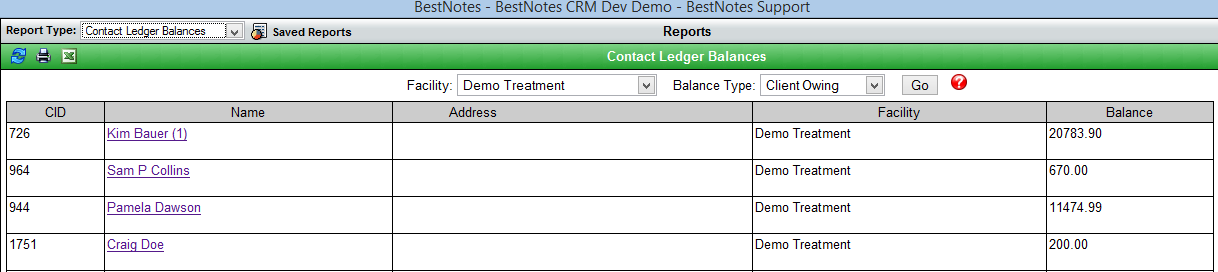
July 29, 2015 - Contact Ledger Balances Report
- This report will show the same balance as seen on the client register tab.
- The report can be filtered by Facility and balance type. The balance type options are 'Client Owing' (positive balance in register), 'Client Credit' (negative balance in register), 'Non-Zero Balances' and 'All'.
- The report is titled 'Contact Ledger Balances' and not client as it looks at all contact types in BestNotes. Ledger items can be applied to non-client type contacts.
.png?1438189322)
August 7, 2015 - Calendar Appointment Includes Ledger Tab
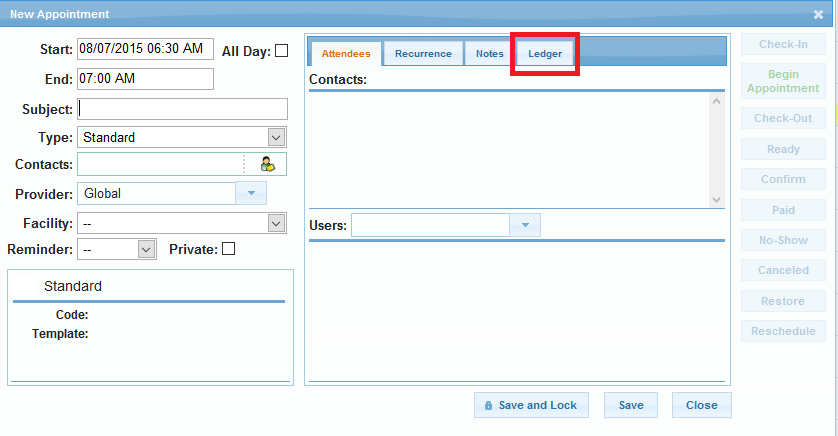
August 19, 2015 - Reports
Client Picture Roster Report
- Now can be filtered by tags.
Discharges Report (NEW)
- Found under Standard reports. Tracks discharges for each category.
- Displays a client's Admission Date, Discharge Date, calculates Length of Stay (LOS), Name, City/State, Referral Category, Referred out Name and Tags.
- Can be filtered by Month and Year.
- Workflow Example: Who were all the discharges per month, who their referrer was and how long they stayed.

October 14, 2015 - Developments
Advanced Contact Search
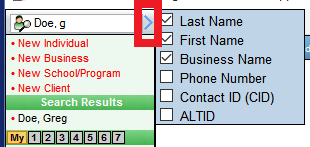
- Now you can search for a Client (Patient), Individual (related contact) and business by their BestNotes CID, Alt ID or phone number by selecting the arrow next to the search field.

Tasks Right-Click Dropdown
- Now you can edit or jump to / open a Client's page with the Tasks Right-click dropdown.
New Ledger Settings
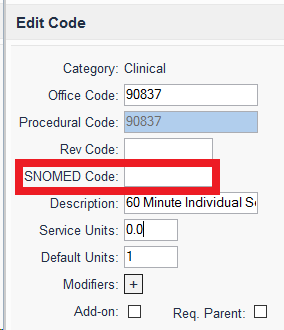
- Now you can add a SNOWMED Code.
C - Black Hole Report
- This report will show all active contacts that have had a previously checked out appointment and do not have a future appointment scheduled.
November 13, 2015 - Developments
Activity Log and General Log Search Button
- To improve efficiency, the contact's page New Note tab (Activity log section) and the General Log does NOT automatically filter when a document is selected. Please click the "Search" button to activate the filter.
Diagnosing Users
- After 10 AM (MST) today (Friday, Nov. 13th), please have all diagnosing users log out and log in to activate the fix for diagnosing sections.
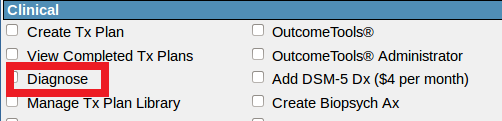
- If any user after 10 AM (MST) is unable to diagnose, please make sure they have the new Diagnose permission and the Add DSM-5 Dx permission, if applicable.
- NOTE: The new Diagnose permission is required to add a diagnosis on a client's chart. The Add DSM-5 Dx permission is also required to take advantage of that specific code set.
December 7, 2015 - Development and Reports
ICD-10 Goals, Objectives and Interventions
- Goals, Objectives and Interventions for both DSM-5 and ICD-10 can now be edited in the settings area.
- DSM-5 categories are mirrored to reflect any changes made in either the ICD-10 or DSM-5 libraries.
Billing Clients Payers Report
- Displays all active clients with an active insurance setup in their Episode tab. It can be filtered by insurance companies listed in Settings -> Payers.
Client Demographics Report
- Dropdowns give the ability to display additional demographic information as well as data form fields.
December 29, 2015 - Reports
- Diagnosis Totals report - has been replaced with TPL Diagnosis Report.
- Diagnosis Axis Report - has been replaced with Diagnosis by Client, which allows filtering of clients by tag, and/or P-Diagnosis by Client. The Diagnosis by Client report also allows filtering by episode/program.
Coming Soon 2016 - Emergency Access
Emergency Access
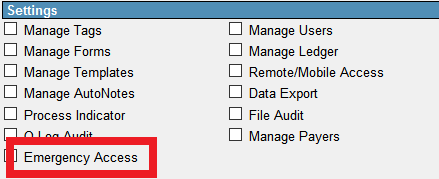
- When a user must access a client's records, who is outside of a user's Access tags, the Emergency Access permission and Settings button will allow a user to do so during an emergency temporarily.
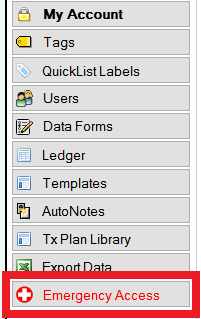
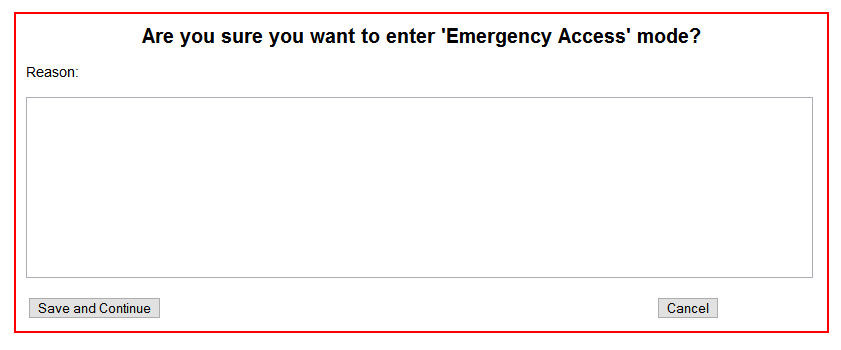
- This is in compliance with BestNotes becoming Meaningful Use Stage 2 Medicaid certified.
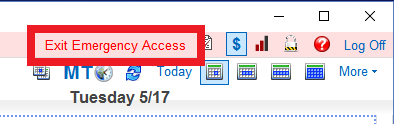
- To exit the Emergency Access, a user will be able to return to the original settings at the top-right of the screen.
November 30, 2016 - Development Updates
ICD-10 Updates
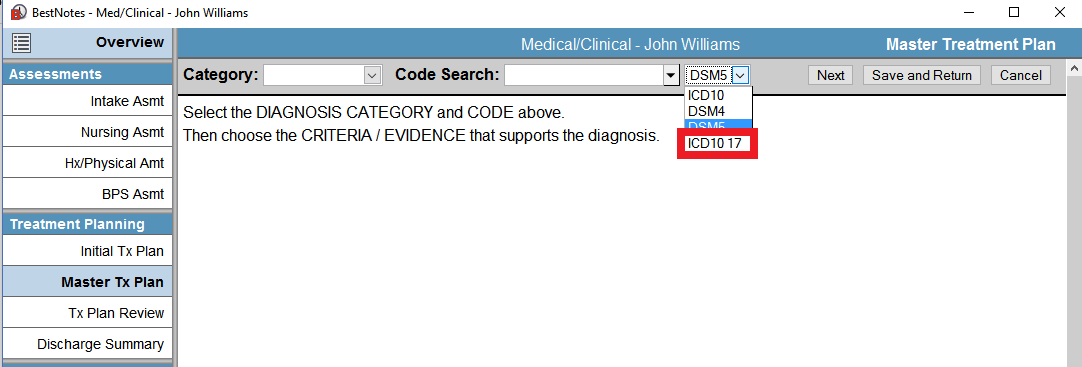
- BestNotes is up-to-date with the current 2017 ICD-10 codes.
- The 2016 ICD-10 codes will not be available later this year.
Allergies Tab by Permission with More Features Coming Soon
- Users with the Allergies permission will be able to add Allergies directly in the Med/Clinical.
- NOTES:
- Only allergies added to DrFirst will populate below a patient's name in red in the eMAR because DrFirst can track med interactions.
- Users will not be able to add Allergies to a client who is already linked to DrFirst.
- Users who have access to DrFirst will need the Allergies permission in order to see this tab.
- The Code category is for RXNorm codes (https://www.nlm.nih.gov/research/umls/rxnorm/overview.html).
- A special field and contact page header (demographics area) will be coming soon, please practice with this in the meantime.
- NOTES:
Group Notes Participants Name No Longer Displays Nickname
- BestNotes is working on improving the Group Note contact search.

- Look for more functionality coming soon.
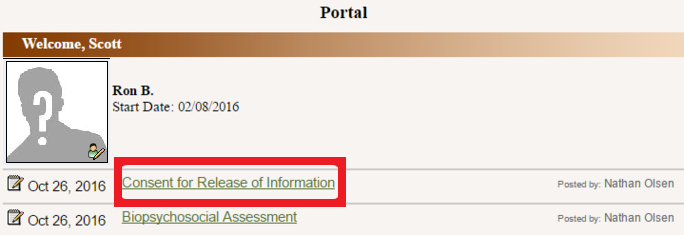
Consent Titles
- Consent titles will display in a client's Activity Log (Chart) and Portal.
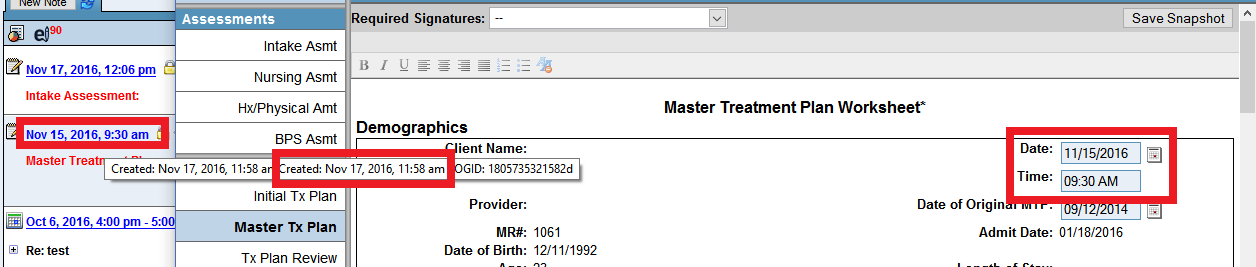
Define TIME on Med/Clinical Snapshot (Backdating)
- NOTES:
- These have to be turned on with a request from your System Administrator on this website.

- It only changes the title/label that displays on a Client's Activity Log (Chart) and does not change the Date and Time that a document is created on the Database.
- Assessments
- Treatment Plan

Allow a Zero to be Entered into an Academic Grade
- This will need to be turned on by BestNotes Support.
BestNotes Will NOT Allow "LOC", "loc" & "LOC_" in Tags
- LOC in Tag names is reserved for BestNotes backend code.
- Tags are limited to 32 characters.
December 8, 2016 - eMAR Updates
Stop Dates
- Meds with Stop Dates on and after a date is reached will not display in PRN or MedPass time administration lists.
- NOTE: The Med will continue to display in a Patient's eMAR Settings area (a User requires the eMAR - Manage Patients permission to see this screen).
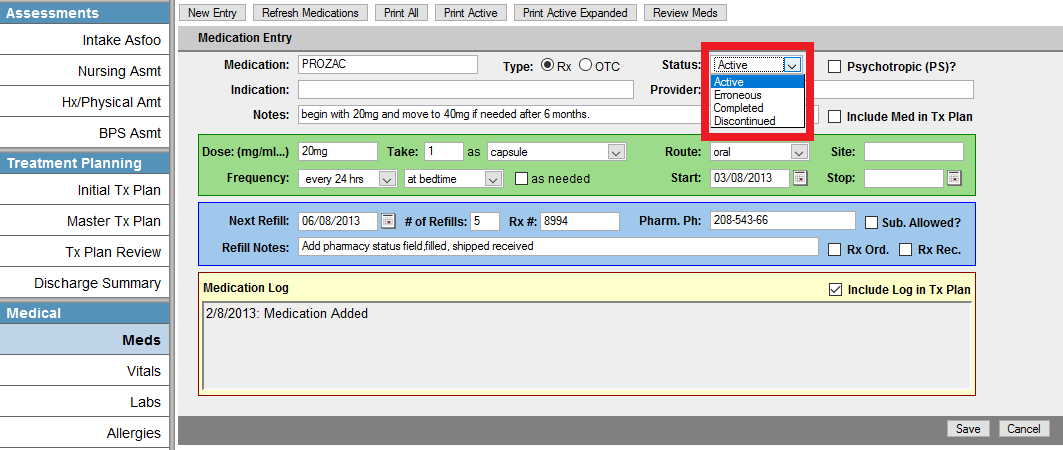
- To change the status of a med (inactivate / discontinued) depends on if the patient is linked to Dr. First:
- If Patient is NOT linked to DrFirst, go to the Patient's BestNotes > Med/Clinical > Meds tab > Edit Med button > Change status.
- To change the status of a med (inactivate / discontinued) depends on if the patient is linked to Dr. First:
- If the Patient is linked to Dr. First:
- The med must be inactivated/discontinued in Dr. First.
- If the Patient is linked to Dr. First:
- The Stop Date is based on the Central Timezone.
December 12, 2016 - eMAR Updates Follow-up
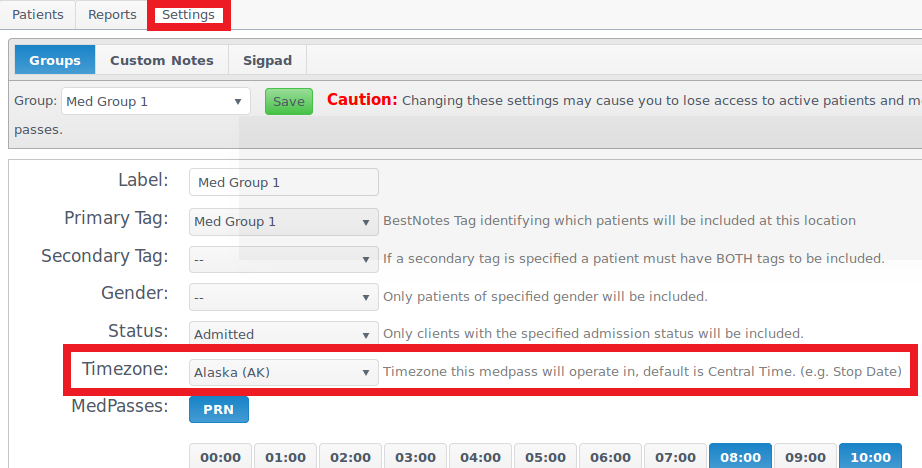
Time Zone Group Settings Feature (e.g., for Stop Dates)
- Users with the eMAR Configure Settings permission may need to adjust the default Central Time Zone in the eMAR Settings tab for each eMAR Group. This ensures Meds with Stop Dates display correctly in PRN and MedPass time lists.
- NOTE: A med with a Stop Date reached will not display in the PRN / MedPass lists once 12:01 AM is reached for the Time Zone set in the eMAR Settings tab.
Stop Date Messages in Patient's Settings
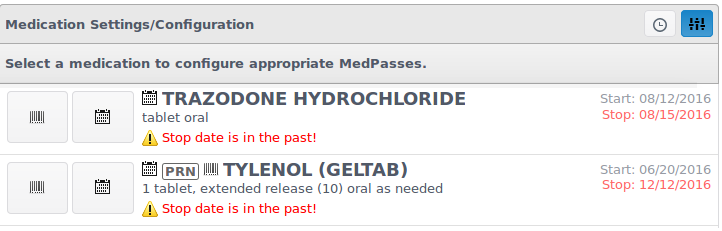
- Users with the eMAR Manage Patients permission will see "Past Stop Date" messages in the Patient's Configure Settings screen on Meds with Stop Dates reached.
- See December 8th updates below on what to do with these meds.
December 28, 2016 - Development Updates
General and Activity Log / Note Filtering by Status
- General Log- New Status dropdown menu features:
- New option - Sent to Portal (globe highlighted blue or orange).
- Will not display Appointments or Media files when Note Status is changed.
- Can be combined with other filters (e.g., to see all logs from one specific Note title that are on the portal).
- Activity Log- New Status features:
- Will not display Appointments or Media files when Note Status is changed.
- The Sent to Portal status is fixed.
Next Steps
- See also: ICD-10 Goals, Objectives and Interventions
- See also: RXNorm codes overview
- See also: Ledger Tab in Calendar Appointment Dialog
- See also: Insurance Billing Setup
- See also: Portal Account Created
- See also: P - Program Demographics
- See also: Register/Ledger Tab (Modifier)
- See also: Authorizations
- See also: Calendar Appointment Types
- See also: Library Custom Reports
- See also: Calendar Tasks Permissions
- See also: Creating Appointments
- See also: HIPAA Compliant Client PIN Signature (On-site)
- See also: Portal Account for Clients & Related Contacts (Parent)
- See also: Register Tab
- See also: Admissions: Importing Applications with the Application Manager
- See also: Portal Permission and PIN
- See also: Making Information Available on the Web Portal
- See also: General Log
- Overlay Calendar in Single Day
- DSM-IV and DSM-5: Filling Out the Diagnosis
- Calendar Navigation (Original & Current)
- BestNotes Mobile App
- Password Settings
- Client PIN Signature System
- Level of Care
- Default User Types
- Special Fields