This article provides a comprehensive overview of new features, updates, and improvements released in BestNotes throughout 2020, covering enhancements to reports, mobile applications, calendar functionality, templates, and system administration.
What's New in BestNotes (2020)
December 31, 2020
Update to "P-Adm/Trans/Dis" Report
We have added 2 new summaries to our "P-Adm/Trans/Dis" report. The original summary shows a combination of the discharge and inactive reasons. The new summaries will show the discharge reasons in one, and the inactive reasons in another summary.

Mobile App Update
We have updated our mobile apps to version 4.0.5. This will support the new checkboxes in the Templates, and you will now be able to interact with and save the checkboxes when using the mobile app.

December 30, 2020
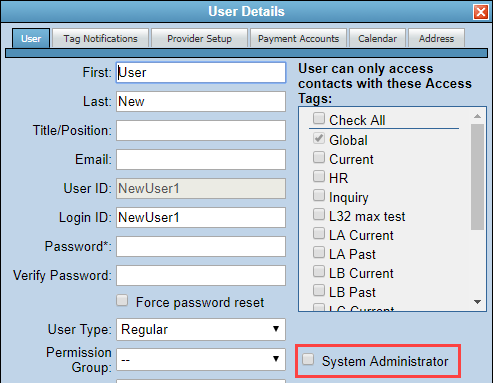
System Administrator User Update
All users that have the "System Administrator" checkbox selected will now have the ability to access the "Audit Report". This was previously only available when logged in on the sysadmin account.


December 28, 2020
A new field has been added to the "Facility" management screen labeled "Default ToB". This allows you to specify the default type of bill for UB04 claims from the claims manager.

December 17, 2020
Calendar Updates
When viewing the user search in the Calendar, you will notice some updates! First, the filtering will show the correct headers, showing whether the user is active or inactive.

You will also notice that there is now a "User Group (Inactive)" section. This section will display your User Groups and it will let you know how many users in that group are inactive. This number will also show how many active users are in the User Groups list. Keep in mind, if you make updates to that user group, the inactive users are automatically removed.


December 16, 2020
Client Chart Update
You can now request to add the "Referral Type" to populate from the "Edit Client" screen, onto the client's chart. To add this, send a request to submit a support ticket or call (866) 543-6646.

Portal Application in Activity Log
When viewing a portal application in the client's activity log, you will now see the name of the application.

New Special Field: {XAPPOINTMENTDETAILS}
We have added a new special field. This field will work in Templates, GroupNotes, and AutoNotes. This field will display the appointment date, the start and end time, and the duration of the appointment. To utilize this special field, place it in the template that you wish to see it in. The special field is, {XAPPOINTMENTDETAILS}.

December 9, 2020
Calendar Bug Addressed
On December 4th we discovered that an update that was deployed on October 21, 2020 adversely affected our recurring calendar appointments. A fix was deployed on December 7th. Calendar appointments affected were those in a series where the appointment type was changed. If the appointment type was changed during this time period it did not update the ledger tab of the appointment to reflect the ledger code associated with the new/changed appointment type. We have generated and reviewed a report to identify all calendar activities since October 21, 2020 and identified customers and specific appointment series that may have been affected. We are reaching out to them to review these potentially affected appointments to resolve any issues with existing appointments. If you have any questions, you can reach out to our support team for assistance.
December 8, 2020
Template and Note Updates: Checkboxes
We have added the ability for you to add checkboxes to your notes! You can add a checkbox to your template by navigating to the "Templates" located in "Settings". Once you have selected the template you would like to edit, place your cursor where you would like to checkbox to be placed. You will then select the "Checkbox" icon located in the toolbar on the top of the page. Once you have made your edits, save the template. When you create a new note with this template, you will have the ability to select the checkbox that you have added. This functionality will also work the same way in template style group notes.


December 2, 2020
Mobile Biometric Unlock
You now have the ability to unlock BestNotes using your biometrics instead of the PIN. In order to use this new feature, your current device must already have the biometrics capability. Once you are logged into BestNotes, from the menu on the left hand side select "Settings". From this page, select the checkbox next to "Enable biometrics". You will now be prompted to use your biometrics instead of your PIN when unlocking BestNotes.


Mobile Logout Alert
When you log out of the mobile app from the main menu, you will receive a logout alert.

Mobile Q-Log Note Type Options
When you create a Q-log note, you will now have the option to select from the same list that you have in the desktop application.

Mobile App Signature View
When your clients sign documents on the mobile application, they will now be able to view the document at the time of signature.

November 17, 2020
Payer Information Updates
When viewing the payer information in the "Episode" tab, you will now see the "Co-pay" field listed. You will also see the payer information when selecting the client in the "Attendees" tab of the appointment. The information that will be displayed include the "Active Primary Payer", "No active payer", and "Cash only". Just as it does in the payers tab, the "Cash Only" option will override an active payer. This will also not display any secondary or tertiary payers. This will always display what is set in the "Episode" tab at that point in time.


New Permission: Un-Check-In Appointments
A new permission has been added to BestNotes. This permission can be found in the "Calendar/Tasks" section. The purpose for this permission is to allow you to restrict which users can "un-check-in" an appointment. When this permission is removed from a user, the "Un-check-in" button will no longer be visible. Like all other permissions, the user that has had the permission removed will need to log out and log back in for the updated permission to take effect. All existing users will have this permission by default.


November 12, 2020
Saved Reports Update
We have updated the look and feel of the "Saved Reports." This has been adjusted when viewing the list of "Saved Reports" and when adding a new report to the "Saved Reports."


November 5, 2020
Authorization Code Search Improvement
We have improved the search capabilities when searching for an authorization code. You will now receive relevant results starting from the first two characters entered when searching.

Telehealth Mobile Update
When you are using telehealth via the BestNotes mobile app, and you select "End Session", you will now receive a confirmation message stating, "Successfully ended telehealth session". To see this update, be sure you are on mobile version 4.0.2.


Mobile Date Display Format
The date format has been updated in the mobile app to display as MM/DD/YYYY for the "DOB", "DOA", and the "DOD" fields.

November 4, 2020
Audit Report Update: Appointment Tracking
As of today, the audit report will track which users created and deleted an appointment. This has been activated to show on the audit report for all companies.

Note Management Update
When managing your notes, you will be required to keep at least one note or note type active.

October 27, 2020
Adding Signers to Templates and Notes
We have updated the way signatures are added to templates and notes to be the same as it is in med/clinical. This will minimize the number of steps needed to add a related contact to your template or note. In addition to the ability to add related contacts as signers, when you are creating a note, you will have the ability to log that note to the related contacts as well.


October 22, 2020
Consent Workflow Update: Patient Not Present
When you are filling out a consent form for a client, you will now have the option to select "Patient not present" consent forms. This selection will result in the window not locking the main BestNotes window. This will also not prompt for the patient signatures when selecting "Save and Sign", and will then log the consent form to the activity log to be signed later or sent to the portal for signature. This option is intended to be used when you are not physically meeting a client.


Contact Sheet Print Update
When you are printing the contact sheet, if the client had any related contacts, some of the relationships were not displayed. This has been adjusted, and will now display all relationship types.

Mobile App Updates (Version 4.0.2)
We have released version 4.0.2! There were some Android customers that were having issues inputting information into the BestNotes mobile app. There were some communication errors between the BestNotes mobile application and the Samsung and LG keyboards. These errors have been resolved, and you will no longer have any issues attempting to input information into the mobile application including entering your PIN.
Both the Android and the iOS applications have been updated to have the same phone number formatting that is in the desktop application.
We have also added the ability to filter for consents in the document filter.
October 12, 2020
Contact Relationship Updates
The related contact relationship list has been updated. When you define a contact relationship you will now have the ability to assign the relationship types of "Parole/Probation Officer", "Case Manager", and "Sponsor". You will now have hover text to display multiple relationship types.


Telehealth URL Update
When you are using BestNotes Telehealth, the URL that is created for the appointment will now be shorter for all appointments created from today moving forward.

October 9, 2020
Mobile App Updates (Version 4.0.0)
The mobile app has released a new update to version 4.0.0 as of today. This release includes the following updates.
- New look and feel!
- More options in Contact Detail! You can now update the Alternate ID, Gender Identity, Preferred Pronouns, and more!

- In the calendar:
- Start and End BestNotes Telehealth sessions.
- In the calendar:

- Clickable Meeting URL links.

- In Documents/Files:
- Upload more file formats to Documents.

- Assign User Groups to files on upload.

- Pin screen will redirect to the login page if user password is changed in the desktop application, or if a user is inactivated by an admin and attempts to unlock the mobile app with a successful PIN.

This is a small taste of additional updates that you can look forward to!
September 30, 2020
2021 ICD-10-CM Updates
There are new ICD-10-CM coding updates that will be released into BestNotes on October 1, 2020. These updated codes include a new code for vaping related disorders and COVID-19. To review the updates to the codes and for more resources, visit our 2021 Annual ICD-10-CM updates.
September 23, 2020
Telehealth Report Update
Now that there is an "End Session" button available on the calendar, when that button is used, the information for that appointment is immediately reflected in the Telehealth report. If you don't select the "End Session" button and the session ends on its own, this information will not be reflected in the report until the next day. For additional information, visit Telehealth report.
Portal Logo Update
We have updated the BestNotes logo in the bottom left corner of the portal.

September 16, 2020
Telehealth Functionality Updates
We have made some adjustments to how telehealth works. If a telehealth appointment has been canceled, this will disable the "Start Session" button. If a telehealth appointment session has started, the cancel and reschedule options are disabled. And finally, if you decide to unsubscribe from BestNotes Telehealth, on any existing telehealth appointments, the "Start Session" and "End Session" buttons will be visible, but will be disabled. If you subscribe or unsubscribe from BestNotes Telehealth, you will need to log out and log back in for the update to take place.


September 11, 2020
Telehealth Usage Report Update
The "Telehealth Usage Report" has been updated. This report will now show the duration of the appointment in hours, minutes, and seconds. This will now also include the "Participant Minutes" and "Session Cost" with the total cost being displayed at the top. The charges are based on the active minutes a participant is connected, and there may be differences between the duration and the participant minutes.

September 2, 2020
BestNotes Status Page
BestNotes has created a "Status" page. The purpose of this page is to provide you with information regarding any downtime that may occur. You can subscribe to this page to receive email alerts of downtime in specific areas of BestNotes by navigating to the bottom of the page and selecting "Subscribe". You can also view this page at any time by going to our Status page, selecting the link on our login page, or selecting the icon in the header of BestNotes.


August 25, 2020
Manage Users Visibility
When you have the permission to manage users, if you didn't have the appropriate access tag to view other users, you could not see that user's account. You can now see all created users for your location, but you can only edit the users you have the appropriate access tags for.

August 18, 2020
Consent Updates: Release of Information
We have updated our consents. The release of information radio button will default to "to exchange information with" instead of "to release information to".

July 27, 2020
Templates Update: Unsaved Changes Warning
When making edits to a template, if you select the red "X" button to close the window without first selecting the "Save" button, you will receive a warning. This warning will appear if there are any edits, AutoNotes used, or text copied and pasted into the template, and you have not selected "Save" prior to selecting the red "X."

July 17, 2020
Labs Update: Auto-Linking Results
All lab results will now attempt to link the results to the correct client. These results will match based on an exact match for the following identifying fields:
- First name
- Last name
- Date of Birth
- Sex (Male/Female)
If there are two clients in your system that have the same information in these fields, the autolink feature will not work, and the results will need to be linked manually.
June 25, 2020
Custom Medications Updates
We have made some updates to the look and feel of our "Custom Medications" and the "Meds" tab. We have updated a few of the icons and the color scheme. To learn more about "Custom Medications" visit Custom Medications setup or Using Custom Medications.
Calendar Notifications Update
We have made an update to the functionality of our calendar appointment notifications. If a user other than the provider checks-in an appointment, the provider will receive a tray notification (bottom right of the screen) that will disappear on its own after 10 seconds. If the provider checks-in an appointment, the provider will not receive any notification.
May 13, 2020
Site ID Location for System Administrators
As of today, any user that logs in as the system administrator, or any user that is assigned the "System Administrator" checkbox, will find the "Site ID" on the "My Account" page in their BestNotes.

April 7, 2020
Audit Report Update: File Download Tracking
We have added the ability to report files that are downloaded from the items in the client's "Files" tab and any "Media/Document" items in the activity log. To begin recording this action, log in to BestNotes as "sysadmin", and navigate to the "Audit Configuration" in "Settings". Scroll down to the "Clinical Note" section, and select the checkbox for "Download".


April 1, 2020
Diagnostic Tool Update: Criteria in Treatment Plans
When pulling a diagnosis forward into a treatment plan, you will now see the "Diagnostic Criteria" listed below the diagnosis.


March 31, 2020
User Audit Report Update: Platform Filtering
To assist companies in the transition to the new BestNotes application, we have made some adjustments to our "User Audit" report that is available for the system administrators. You will now have the ability to filter this report based on the platform that your staff are using. By selecting the checkbox next to "Show Updated Desktop Application View" and select "Go", you will be able to see how many users have transitioned to the new BestNotes application. On the individual level you will have the ability to see which users are still using the outdated application, which platform they are using, and which IP address to help define location.


March 30, 2020
Appointment Ledger Tab Update: Addons
We have made some adjustments to the functionality of the ledger tab in an appointment. In order to manipulate the ledger tab in an appointment, you must have the "Ledger Entry from Log" permission. You will now have the ability to select the addons that you want to apply to that appointment by selecting the checkbox. All addon options will still be visible after it has been saved. Once the appointment has been checked out, there will be a register entry in the client's chart for the associated code, and an additional entry for each addon. You will then also have the ability to add additional addons from the "Register" tab by selecting the plus icon next to the code. This action will create another entry on the "Register" tab.


March 26, 2020
Telehealth Link Update
An update has been made to our meeting link. This has been renamed to "Telehealth Link". Once a link has been added, you will have the ability to send the meeting link and details to the contacts that are included on the appointment. Clients will be able to select the link from their email to join the meeting. Once the link has been sent, the icon will change, and you can select the icon to view who the link was sent to, and what date and time it was sent. This link can only be sent once per appointment, if you need to send out a new or updated notification, you will need to create a new appointment to replace the existing appointment. If you don't see the updated link, log out of BestNotes and log back in.


March 24, 2020
Application Update Notification
For any users that have not upgraded to our most recent application, you will begin to see a notification in the top right corner of your BestNotes. This will let you know that you still need to update, and will give you a link with instructions regarding how to do so. If you have any questions, contact submit a support ticket or call (866) 543-6646.

March 11, 2020
Med/Clinical Snapshot Icon
If a snapshot has been created for an assessment or treatment plan document in the med/clinical, you will now see an icon next to the name of the document. Selecting this icon will show you the most recent snapshot of that document.


February 26, 2020
Preferred Pronouns Field Added
BestNotes has added a field on the Edit Client screen that will allow you to select the client's preferred pronoun set. Making a selection in this area, such as "They, Them Their, Theirs, Themself" will translate in all pronoun special fields that are in your documentation.


February 24, 2020
Updated BestNotes Desktop Application Available
BestNotes has created an update to our current application that is now available!
Benefits include:
- Faster loading time

- Improved visual experience
- New Security features that make BestNotes even safer
- Free for BestNotes customers
- Quick download and install
Act Now! This updated desktop application needs to be replaced prior to March 31st, 2020 to avoid any service disruption!
January 30, 2020
Med/Clinical Update: Signer Search
Updated BestNotes Application Only
When using assessments and treatment plans, if you need to add a signer, you can now search for the signer.
January 13, 2020
New BestNotes Desktop Application Available
BestNotes has created a new and improved version of our current application that is now available!
Benefits include:
- Faster loading time

- Improved visual experience
- New Security features that make BestNotes even safer
- Free for BestNotes customers
- Quick download and install
Act Now! This new version of BestNotes will be replacing the current version soon!
January 7, 2020
System Administrator Login Requirements
When logging in as the System Administrator, the secondary authentication must now have the System Administrator checkbox selected on their user account. Any user with this checkbox active, that also has the master password for the System Administrator account can log in as the system administrator.
January 6, 2020
User Settings Adjustment: Calendar Appointment Labels
When managing individual Calendar Settings from the User Details window, the appointment type labels were not displaying correctly, and was causing alignment issues. This has been updated to have proper spacing between the appointment type labels, and now displays as expected.

Next Steps
- How to Install BestNotes using Windows
- How to Install BestNotes using macOS
- 2021 Annual ICD-10-CM updates
- Telehealth report
- BestNotes Status page
- Custom Medications setup
- Using Custom Medications
- What's New (2019)